 CuraCourse
At a glance
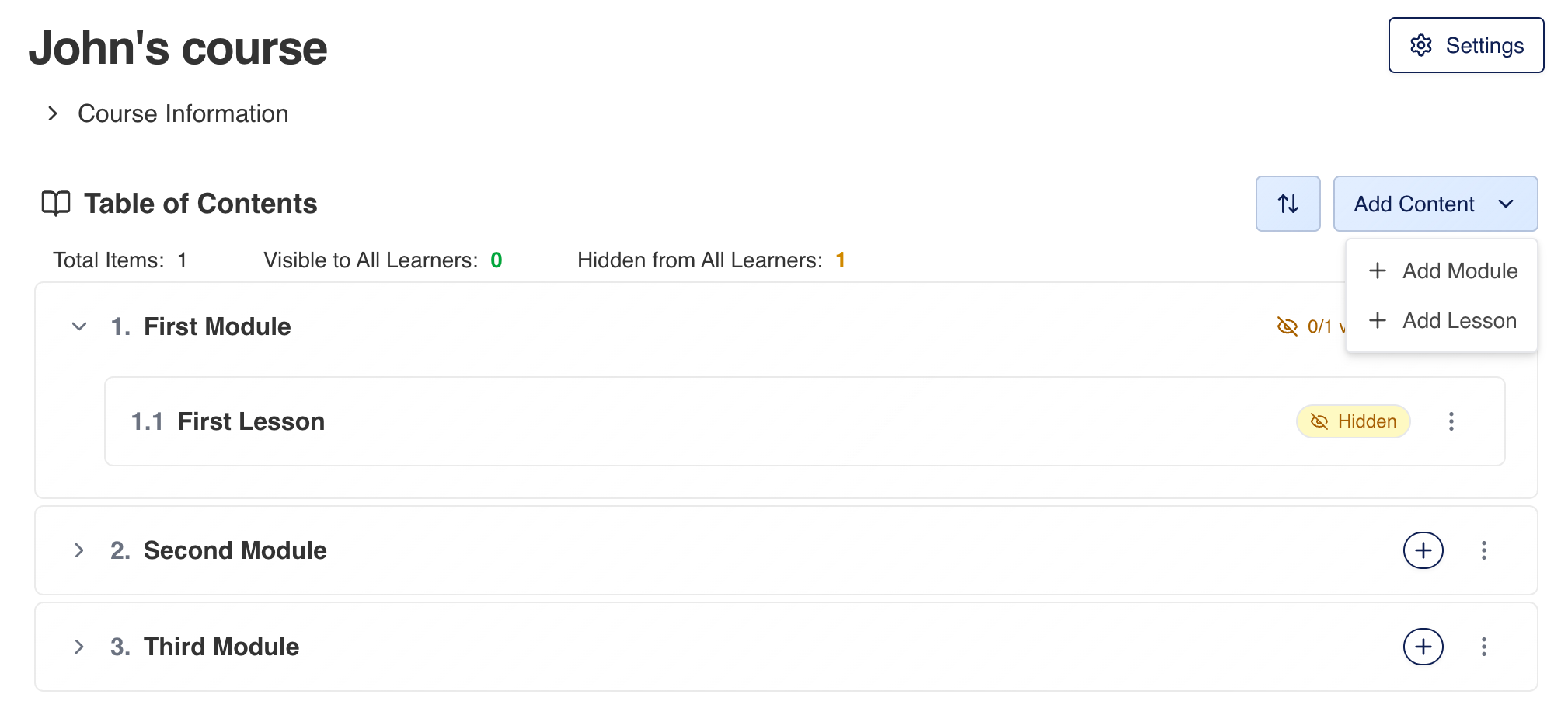
The course page is your Table of Contents: modules and lessons learners navigate. Instructors add structure, reorder items, and see how many pages are visible vs hidden.
Prerequisites
- A course you can manage (instructor or assistant with content permissions).
Steps
-
Open the course from the dashboard.
-
Expand Course Information if you need description, instructor, or institution details.
-
In Table of Contents:
- Click Add Content → Add Module or Add Lesson.
- For a lesson inside a module, use Add lesson on that module row when available.
-
Click a lesson title to open it; use Edit on the lesson header when you’re in instructor view.
-
To reorder, click the reorder control (arrow icon), drag items, then Exit Reorder.
-
Review the summary row Visible to All Learners vs Hidden from All Learners (counts update as you publish via Access Policy).
Common gotchas
- Hidden lessons still appear to instructors; learners only see items that are Visible under Access Policy.
- Add Lesson without a module creates a top-level lesson in the outline.