 CuraCourse
Platform alternatives8 min read
Top Hat alternatives: 4 options for 2026
Looking beyond Top Hat? Here are 4 options for instructors, with what each one does, what it costs, and when Top Hat is still the better pick.

Joe Mazzone · Co-Founder and CEO, CuraCourse
· 8 min read
Top Hat is built for classroom engagement and interactive eTexts. That suits plenty of courses, but not every one.
If you’re weighing a move, the question is what your students do each week. Below are 4 options, what each one does, what it costs, and when Top Hat is still the better choice.
Quick answer
- CuraCourse is best for writing your own lessons, with practice, code, and feedback right in the reading.
- McGraw Hill Connect is best for publisher homework built around McGraw Hill textbooks.
- Pearson MyLab is best for publisher homework built around Pearson textbooks.
- Ed is best for class Q&A, coding lessons, and shared workspaces.
Why instructors look beyond Top Hat
Top Hat is good at what it was built for. Instructors usually start looking when one of these is true:
- You want to build your own interactive activities that save scores.
- You want students to write and run code in any lesson, not only in select titles.
- You want a free option for students, or for the school to pay.
What Top Hat costs
Top Hat lists student access by time: $35 for a four-month term, $58 for a year, or $96 for four years. When an instructor assigns a Top Hat textbook, students pay one combined price that isn’t listed.
The 4 best Top Hat alternatives
1. CuraCourse: best for writing your own interactive course
Choose CuraCourse if you want to build your own activities that save progress and scores, add autograded code to any lesson, or have AI grade written work against your rubric.
Here’s what that looks like in practice, starting with the parts that matter most if you’re coming from Top Hat.
Lessons with the practice built in
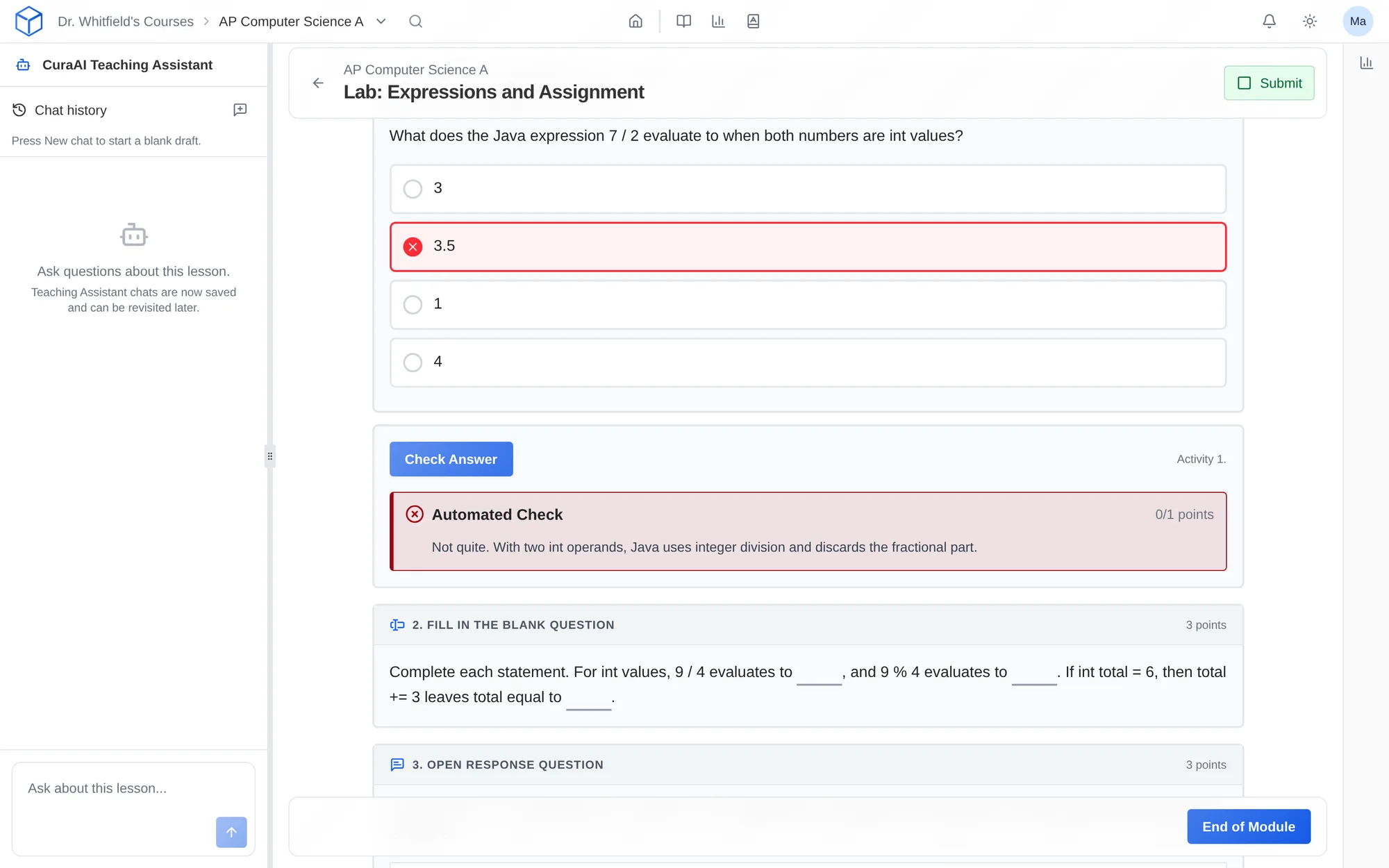
A CuraCourse lesson is a page you write. You explain an idea the way you would in class, then type / and add a question right below it. Students answer as they read, and Check Answer tells them whether they’ve got it before anything is submitted.
Lessons can hold multiple choice, multiple select, fill-in-the-blank, open response, categorization, and ordering questions, mixed in with your text, videos, and equations. Ordering doubles as a Parsons problem, with distractor lines and required indentation when you want them.
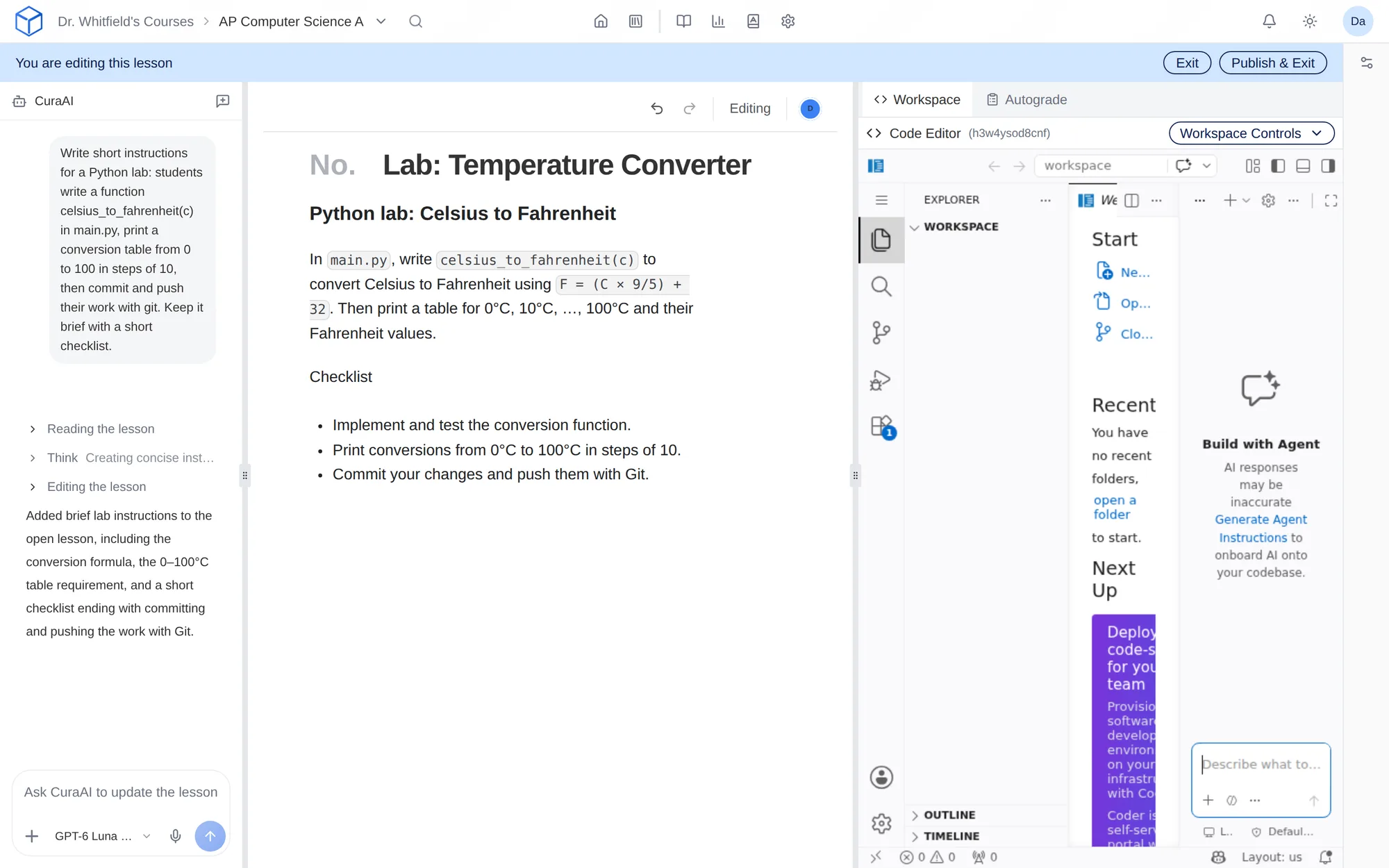
CuraAI helps you write. Ask it to draft a section, rewrite an explanation, or add practice. It works from your course, and tracked changes show what it edited before you publish.
Custom activities when no question type fits
Describe a simulation to CuraAI, like a projectile launcher with angle and velocity sliders, and it builds a first version inside your lesson. You can also write it yourself in HTML, CSS, and JavaScript, and you can always see and edit the code.
Custom activities save each student’s settings, answers, and progress. They can count toward a grade, with all-or-nothing or partial credit against a key students can’t see. Try it as a student first, and the debug panel shows any errors and exactly how answers were scored.
Code that runs inside the lesson
Students write and run code in the lesson with nothing to install. You give them as many starter files as the task needs, lock the ones they shouldn’t change, hide the ones they shouldn’t see, and choose how the program runs.
Each test runs the program with your input and compares its output to yours by exact match, pattern, or partial match. Tests carry their own points, and you can turn off pasting when you want students to type their own code.
Students can also read code before they write it. Code tracing asks them to predict what a program prints and the final value of each variable, and checks their answers without penalizing case or spacing.
Cloud labs for bigger projects
When a course outgrows short exercises, cloud labs give each student a cloud machine running VS Code in a browser tab, with the tools you specify. It runs on a Chromebook, so nobody spends the first week fixing installs.
Students build multi-file projects with databases and servers, commit and push with git, and their work is autograded. You see the results student by student. Labs come with Pro, or with Core plus the $15 labs add-on.
Math and graphs, answered like math
Type LaTeX anywhere in a lesson and it renders as you type. Students answer on a built-in math keyboard, and you pick the layout for each blank: simple, full, numeric, Greek, or symbols.
You decide what counts as correct. Accept the exact form, any equivalent expression, the same value within a tolerance, or only the simplified answer.
For graphs, students plot points, draw lines, circles, and curves, or build geometric constructions on a board you set up. Their drawing is checked against every correct answer you saved, or you grade it yourself.
An AI tutor you control
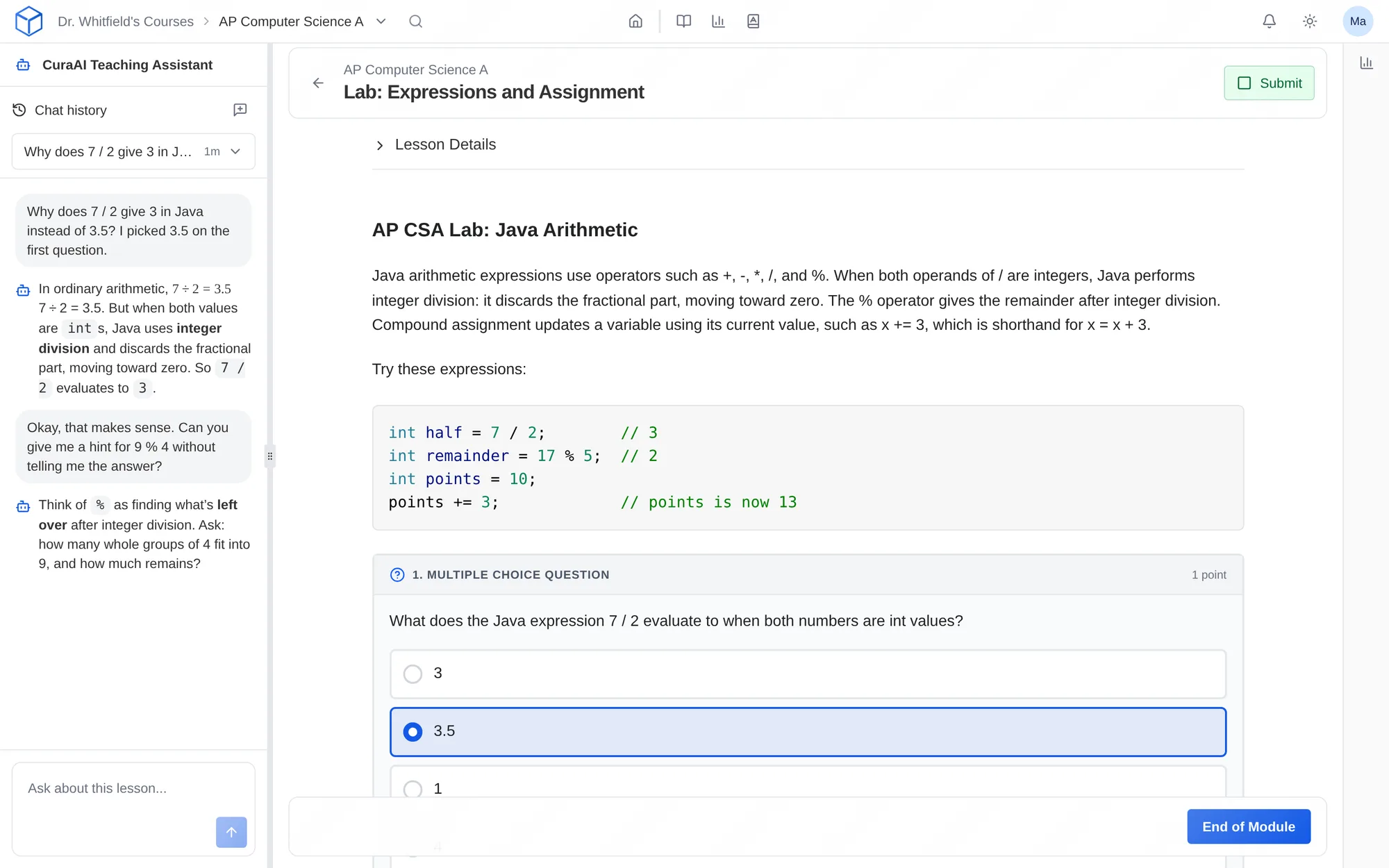
The CuraAI tutor is off until you turn it on, lesson by lesson. When it’s on, it reads the lesson the student is on, so its answers match your material, your notation, and your order. It’s never available during exams.
You choose how much it helps. Level 1 answers questions about the lesson with guiding questions. Level 2 can also see the student’s work and give feedback. Level 3 can suggest code edits the student accepts or rejects.
Tutor conversations are part of the coursework, so you and your TAs can read what each student asked. Reading them the night before class shows you what to go over again.
For practice that is a conversation, AI Chat activities have the AI play a role you describe, like a confused classmate a student has to explain integer division to. You set the goals, the message limit, and the points.
Grading against your rubric
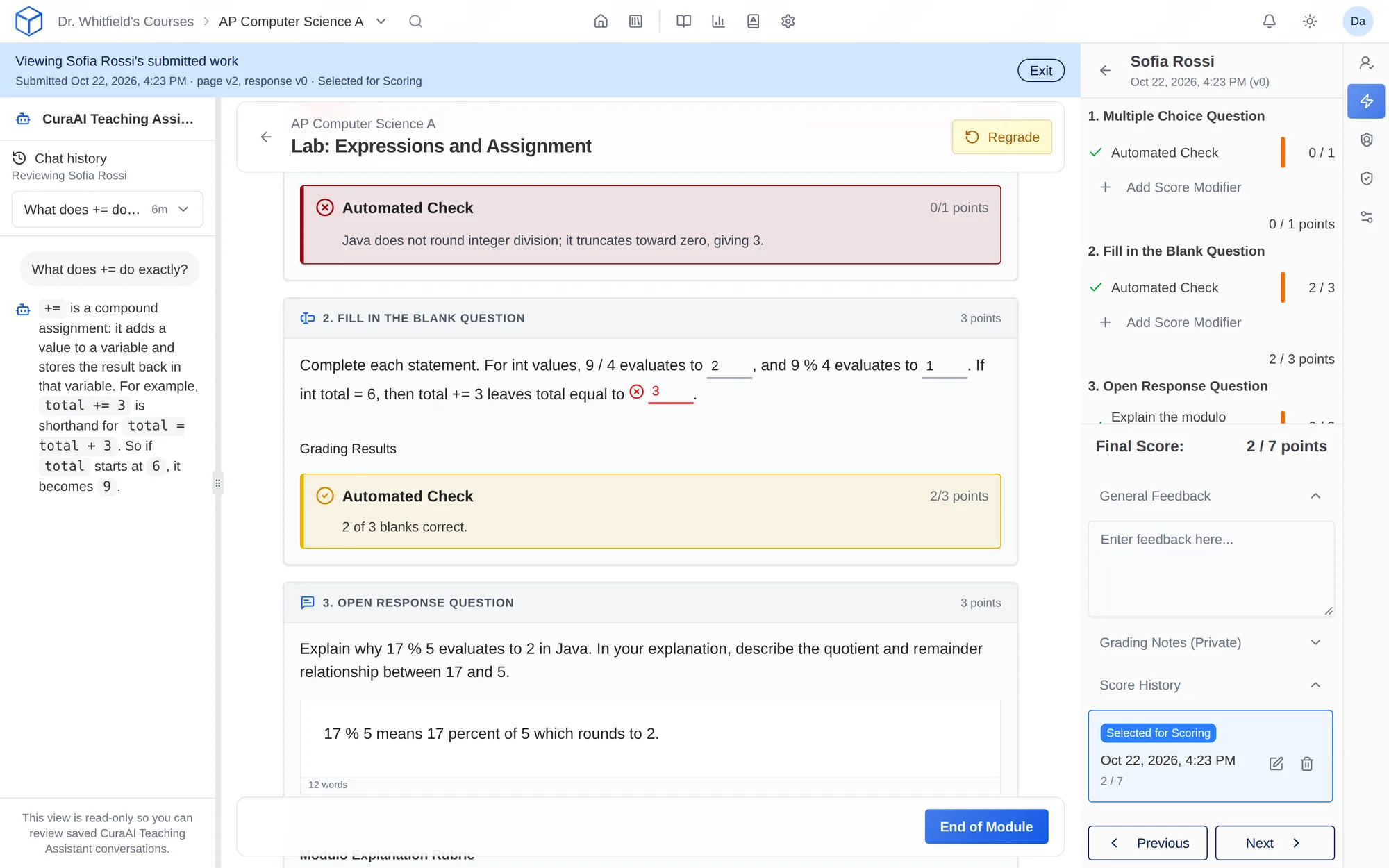
Build a rubric for any activity and grade each part with code tests, by hand, or with AI. For AI grading, you write what you’re looking for and describe each score level. The AI grades against those descriptions, and you can review and change every score.
Lightning Grader shows each submission with its automated checks, AI rubric scores, and feedback, so you can move from student to student quickly. Students can check their answers against the same rubric while they work, which gives them a chance to fix mistakes before they submit.
Exams from the same questions
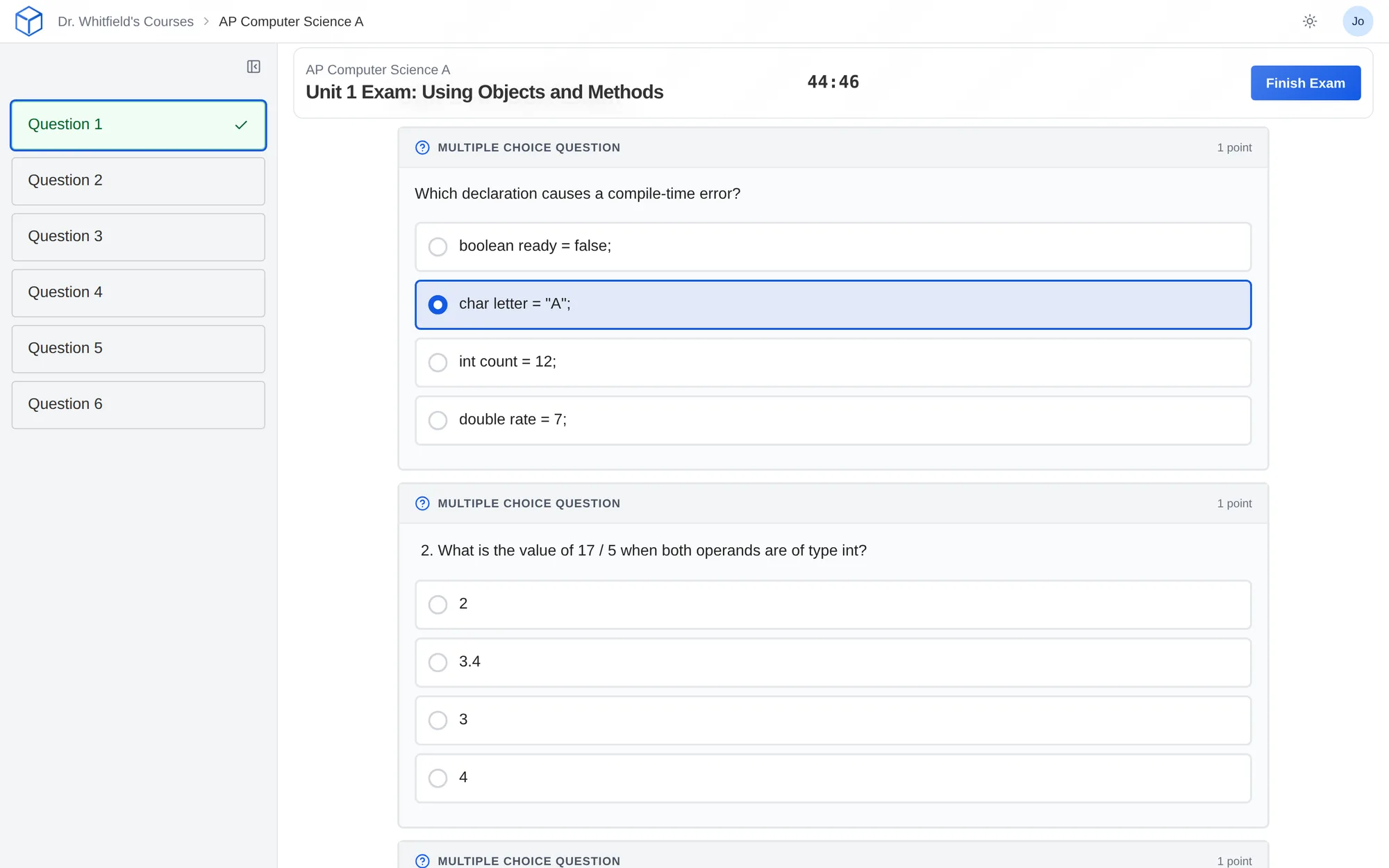
Exams are in beta. You build them from the question blocks you already use in lessons, then set a time limit, show one question at a time, stop students from going back, add a password, set the number of attempts, and decide when grades come out.
Instant feedback and the AI tutor are off during exams. CuraCourse tells you when a student leaves the tab or exits full screen. Treat that as a reason to look closer. It isn’t proof of cheating, and it doesn’t lock down the computer. Exams come with Pro and are a $5 add-on with Core.
Your gradebook and your LMS
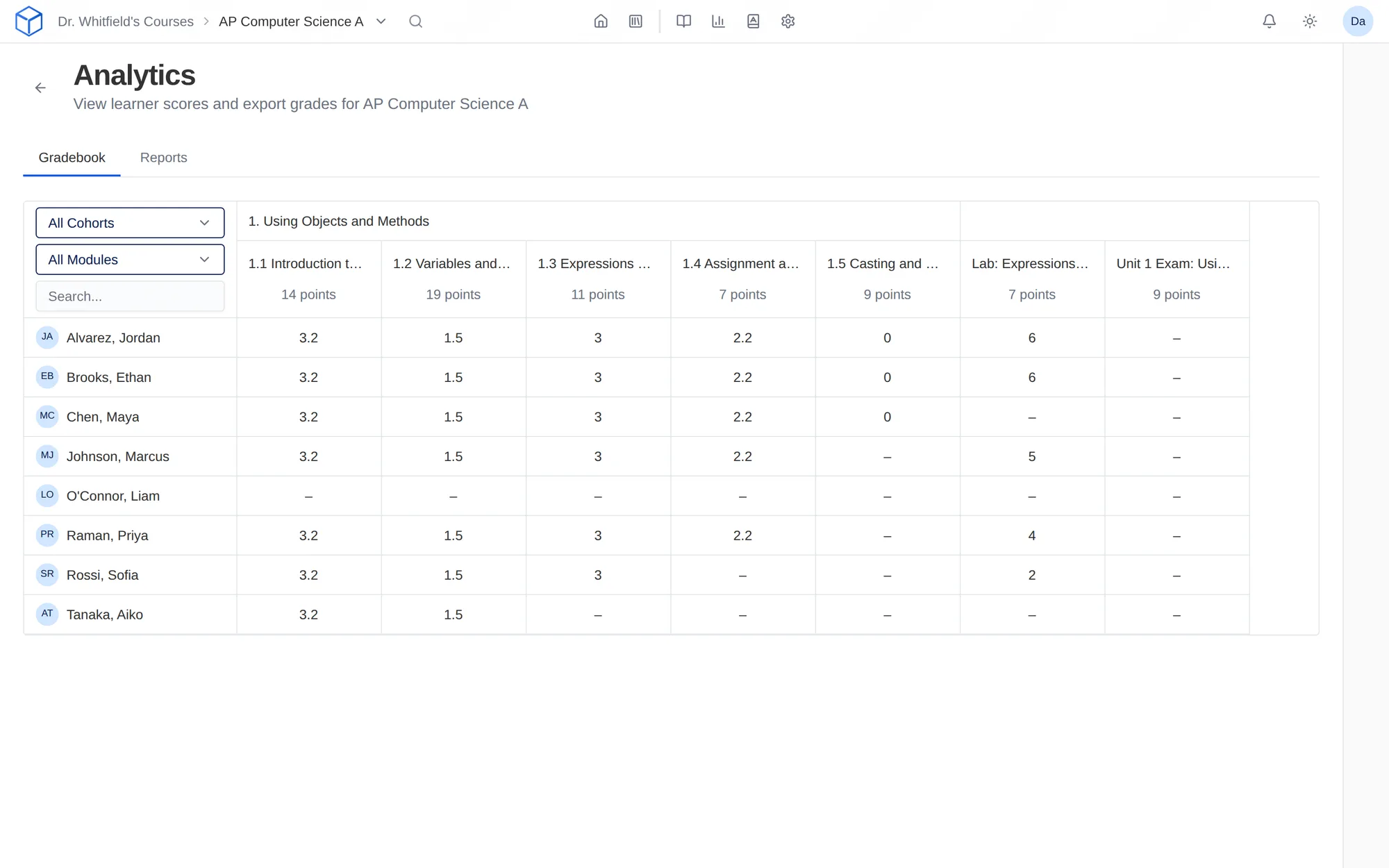
The gradebook shows every lesson, lab, and exam, student by student, so you can see who’s falling behind before the next class. You can export a CSV any time.
CuraCourse connects to Canvas, Moodle, Blackboard Ultra, Brightspace, Schoology, and other LMSs through LTI 1.3. Students launch from your LMS without a new login, and grades sync back to your gradebook. Without an LMS, students join with a class code.
Start from a course that already exists
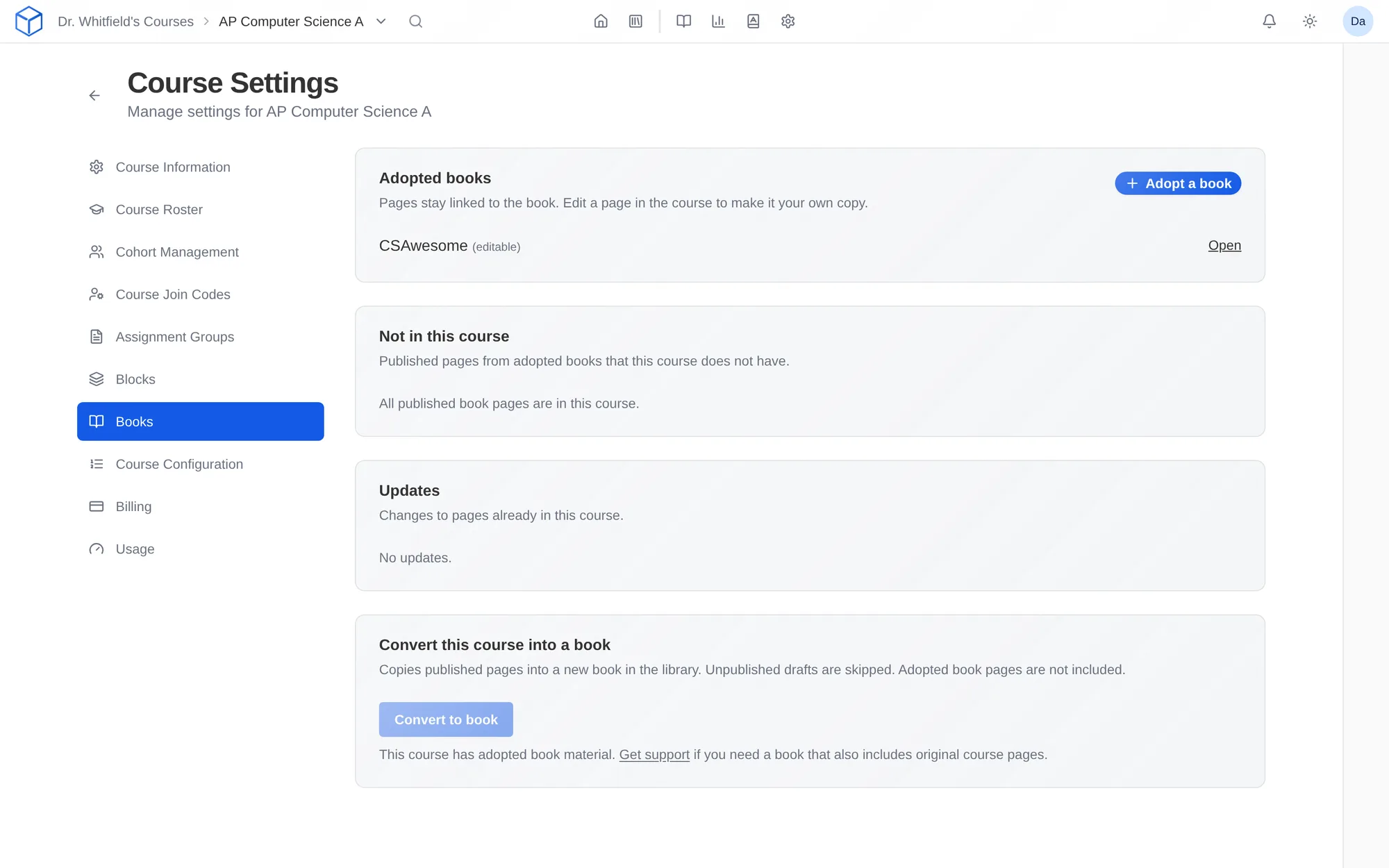
You don’t have to start from a blank page. The bookstore has shared courses, like CSAwesome for AP CS A, that you can adopt and change. Pages stay linked to the book, and the author’s updates show up in your course.
Schools build their own courses too. The University of Rhode Island teaches CSC 101 on CuraCourse and offers the same course in more than 40 Rhode Island high schools through concurrent enrollment.
Where it differs from Top Hat
Your own interactive activities. Top Hat Pages can embed an outside web page, but we couldn’t find a way to save scores or progress from it. In CuraCourse, you build HTML, CSS, and JavaScript activities inside a lesson, or describe one to CuraAI, and each student’s progress and score is saved.
Coding practice. Top Hat has autograded coding questions in select Interactive OpenStax titles. In CuraCourse, any instructor can add runnable code and output checks to their own lessons. Paid plans add cloud-based labs.
What to know before you switch
There’s no one-click import from Top Hat yet. You rebuild lessons by hand, and past grades stay where they are. Most instructors start with one lesson, try it with their class, and bring the rest over when they’re ready.
- Best for
- Instructors who want to write their own interactive course
- Cost
- Free to build. Students pay $0, $20, or $45 per course, or the school pays.
- Works with
- Canvas, Moodle, Blackboard, Brightspace, Schoology (LTI 1.3)
2. McGraw Hill Connect: best for publisher homework built around McGraw Hill textbooks
Go with Connect if you teach from a McGraw Hill textbook and want a finished eBook, SmartBook adaptive reading, and big ready-made question banks. It also fits if your school already uses Inclusive Access for McGraw Hill titles.
Cost: Students buy access for a specific title, or the school uses Inclusive Access. No single published price.
It’s a weaker fit if you want to teach from your own material, not the publisher’s text.
3. Pearson MyLab: best for publisher homework built around Pearson textbooks
MyLab works well if your course follows a Pearson textbook and you want lots of auto-graded problems matched to it. It also has LMS grade sync, LockDown Browser support, and Inclusive Access billing.
Cost: Students buy access for a specific title, or the school uses Inclusive Access. No published prices.
It’s a weaker fit if you want to teach from your own lessons instead of a Pearson title.
4. Ed: best for class Q&A, coding lessons, and shared workspaces
Ed is the better pick if your class runs on a Q&A forum. Ed Discussion has anonymous and private posts, endorsed answers, LaTeX, and runnable code in posts. Ed Lessons and Workspaces add autograded coding challenges and a shared browser IDE.
Cost: Licensed by institutions, and prices aren’t published. Some universities license it campus-wide.
It’s a weaker fit if you want lessons with math answers, graphs, and simulations as well as coding challenges.
How to choose
Start with what your students do each week. If they mostly read and answer questions from a finished book, a publisher or open textbook may be enough. If they write code, work math, draw graphs, and explain their reasoning, you want all of that in one lesson, checked while they work.
Then look at who writes the course. CuraCourse assumes you do, or that you start from a shared course and change it. Platforms built around their own content are faster on day one but harder to make your own.
Last, check how it’s paid for and how it fits your LMS. Every option here connects to an LMS in some way, but prices range from free to institutional quotes.
When to stay with Top Hat
Top Hat makes sense if you rely on live polling, attendance, and in-class engagement, or you want an interactive eText from its catalog.
The takeaway
If Top Hat does what your course needs, stay. If you want your own lessons, with code, math, graphs, AI help you control, and grading in one place, build one lesson in CuraCourse and try it with your class. It’s free to build, and students pay $0, $20, or $45 per course, or the school pays.
We wrote this from each company’s public docs, last checked in October 2026. If something is out of date, tell us and we’ll fix it.
More from the blog
Ed alternatives: 4 options for 2026
4 options for instructors moving on from Ed: what each one does, what it costs, and who it fits.
Joe Mazzone· 8 min read
Pearson MyLab alternatives: 4 options for 2026
4 options for instructors moving on from Pearson MyLab: what each one does, what it costs, and who it fits.
Joe Mazzone· 8 min read
McGraw Hill Connect alternatives: 4 options for 2026
4 options for instructors moving on from McGraw Hill Connect: what each one does, what it costs, and who it fits.
Joe Mazzone· 8 min read