 CuraCourse
Cybersecurity3 min read
Stop assigning cybersecurity readings. Let students try it themselves.
Simulated terminals, firewalls, and attacks that save each student’s progress and grade themselves, built from a description. A teacher couldn’t have done this a few years ago.

Joe Mazzone · Co-Founder and CEO, CuraCourse
· 3 min read
I teach CSF 102G: Cybersecurity Technology and Issues, a college course at the University of Rhode Island where most students aren’t computer science or cybersecurity majors. I wanted them to do cybersecurity, not just read about it.
So I built more than 30 custom interactive activities right into the course: simulated terminals, firewalls, attacks, and a night shift in a security operations center. Here’s what that looks like, and why I think every teacher can do this now.
The short version
- If you can describe an activity, you can have it in your lesson. I built mine with CuraCourse Assistant and Claude Code.
- Simulations give students a safe place to practice before a real cyber range, at a level that works for non-majors.
- Every activity saves each student’s progress and reports a score inside CuraCourse, so student data stays private.
If you can describe it, you can build it
Every activity started as a sentence. “A terminal where students scan a company’s computers and write down what’s open.” “A night shift in a hospital security operations center where every choice has a cost.”
I built many of them by describing them to CuraCourse Assistant, which put a first version right in the lesson. Others I built with Claude Code, starting from tools I’d made years ago, then had CuraCourse Assistant change them to save student progress and report a score. Either way, I tried each one as a student, asked for changes, and kept going until it was what I pictured.
A safe place to practice first
Later, students may work in a cyber range on real systems. Before that, I want them to try the moves somewhere nothing can break. They write a firewall rule and watch malware get through, or get blocked. They type a SQL injection into a fake bank login and watch the query change, then pick the fix.
Getting it wrong costs nothing, so they experiment. That’s the point.
Real ideas, without the jargon
Most of my students won’t become security professionals, but all of them get phishing emails and use AI chatbots. The activities keep the real ideas and skip the setup and jargon a cyber major would wade through.
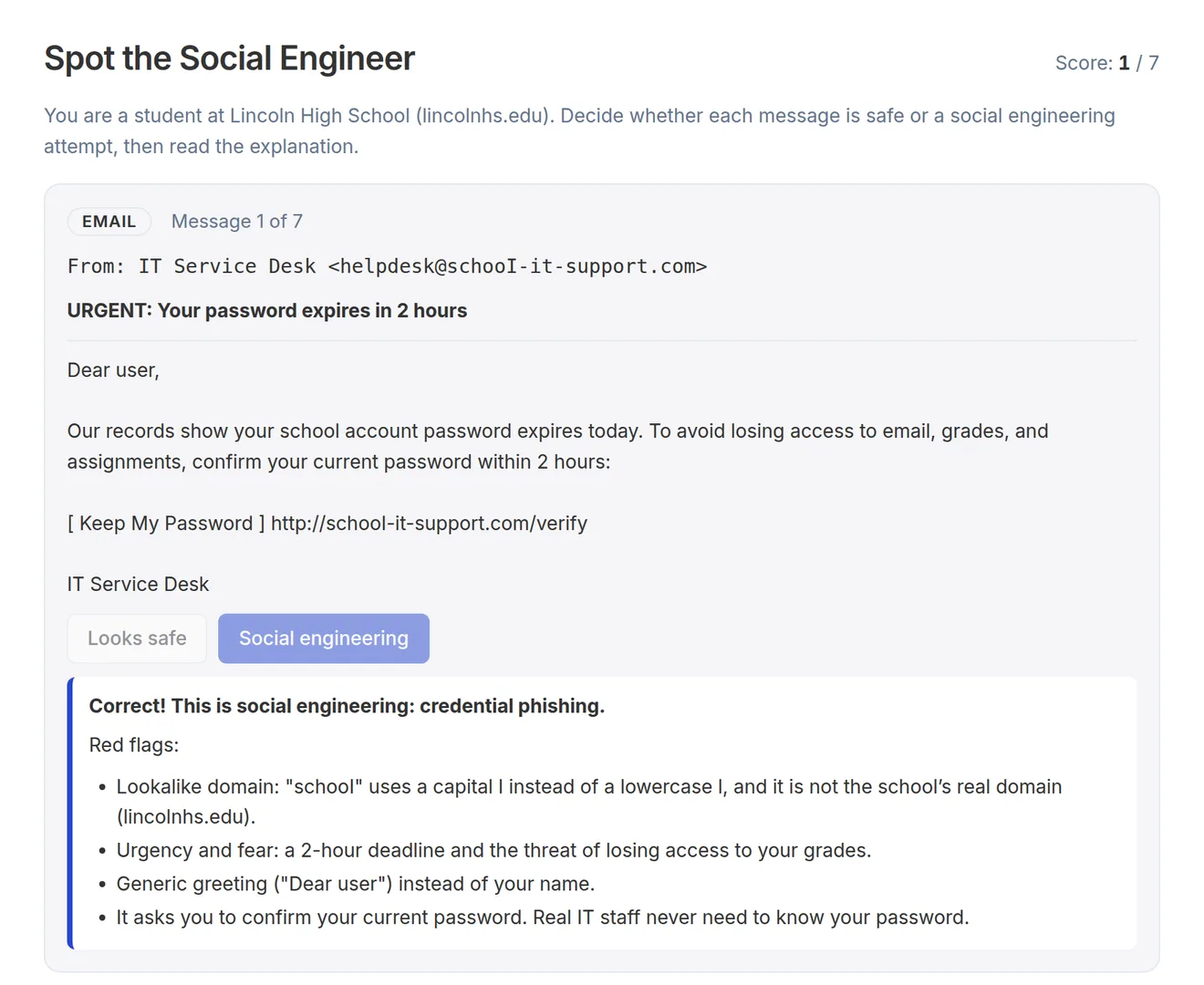
In Spot the Social Engineer, students decide whether each message is safe and learn the red flags. In Guard the Assistant, they protect a school help-desk chatbot from manipulation by turning on defenses and seeing what gets through.
Doing beats reading
A page about triage is easy to skim. A flood of 40 alerts at 11 PM, with a nurse on the phone who needs back into the medication system, is not. Students lean in, they get feedback on every choice, and they remember it.
I see what they did, too. Each activity reports to my gradebook, so I know who finished, who struggled, and where.
Progress and grades stay in the course
You can vibe code a simulation with almost any AI tool now. The harder question is where it lives. A page on a hosting site doesn’t know who your students are, forgets their work when they close the tab, and can’t put a score in your gradebook. If it does collect anything, that data goes wherever the page sends it.
Custom activities in CuraCourse run inside the lesson. Each one saves the student’s progress to their CuraCourse record, so they pick up where they left off, and reports a score straight to the gradebook. The activity runs in a locked-down sandbox that can’t load outside code or send data to other websites. Student data stays in CuraCourse, where we follow FERPA and never use student work to train AI models.
A teacher couldn’t do this before AI
I taught computer science for more than 15 years, and I know what building even one of these used to take: a developer, or weeks of nights and weekends. No classroom teacher had that time, so we linked to someone else’s tool, if one existed, or we assigned a reading.
Now the hard part is the idea. CuraCourse Assistant drafts custom activities, assignments, and lessons from your course, and tracked changes show you what it changed before you publish.
Build the one you’ve always wanted
Every teacher has an activity they wish existed. Describe yours to CuraCourse Assistant and try it with your class. The custom activities help guide walks through building one, step by step. It’s free to build.
More from the blog
Is CuraCourse an LMS?
Yes, it can be. Here’s why I think CuraCourse does what LMSs should have done from the start.
· 5 min read
Codio alternatives: 5 options for 2026
5 options for instructors moving on from Codio: what each one does, what it costs, and who it fits.
· 8 min read
Teach loops with code tracing
Ask students to predict a program’s output and track a changing variable before they run it.
· 2 min read